# Threads
> The thread parts, Threads, ThreadMenu, ThreadSelect, ThreadDrawerToggle, ThreadDrawer, ThreadTitle, NewThread and DeleteThread, and the four picker styles.
The thread parts pick, start and delete threads. They show the end user's threads, which Super Assist keeps, most recently active first. New thread, rename and delete go to Super Assist.
## Usage
Set `threads` on the root and the default header places the parts for that style:
```tsx
```
Or place them yourself. This header opens a drawer and starts a thread, with the host's own buttons:
```tsx
```
`ThreadDrawer` overlays the conversation, so it sits in `Main` beside the other parts, not in the header.
For a panel wide enough to show the list all the time, `Threads` is a column before `Main`. The one-liner places it with `threads="side"`, and leaves the thread parts out of the header:
```tsx
```
Or place `ThreadList` in your layout, here beside an embedded panel. From `examples/app/app/assistant.tsx`:
```tsx
import { AssistedPanel, ThreadList } from "@super-assist/react";
;
```
## What the model sees
Nothing. Each part switches threads through the runtime.
## Parts
| Part | Kind | Renders |
| ---------------------------------- | ---- | ----------------------------------------------------------------------------------------------------- |
| `AssistedPanel.Threads` | Row | The thread list in a 256 px column before `Main`, with its New Thread button and search. |
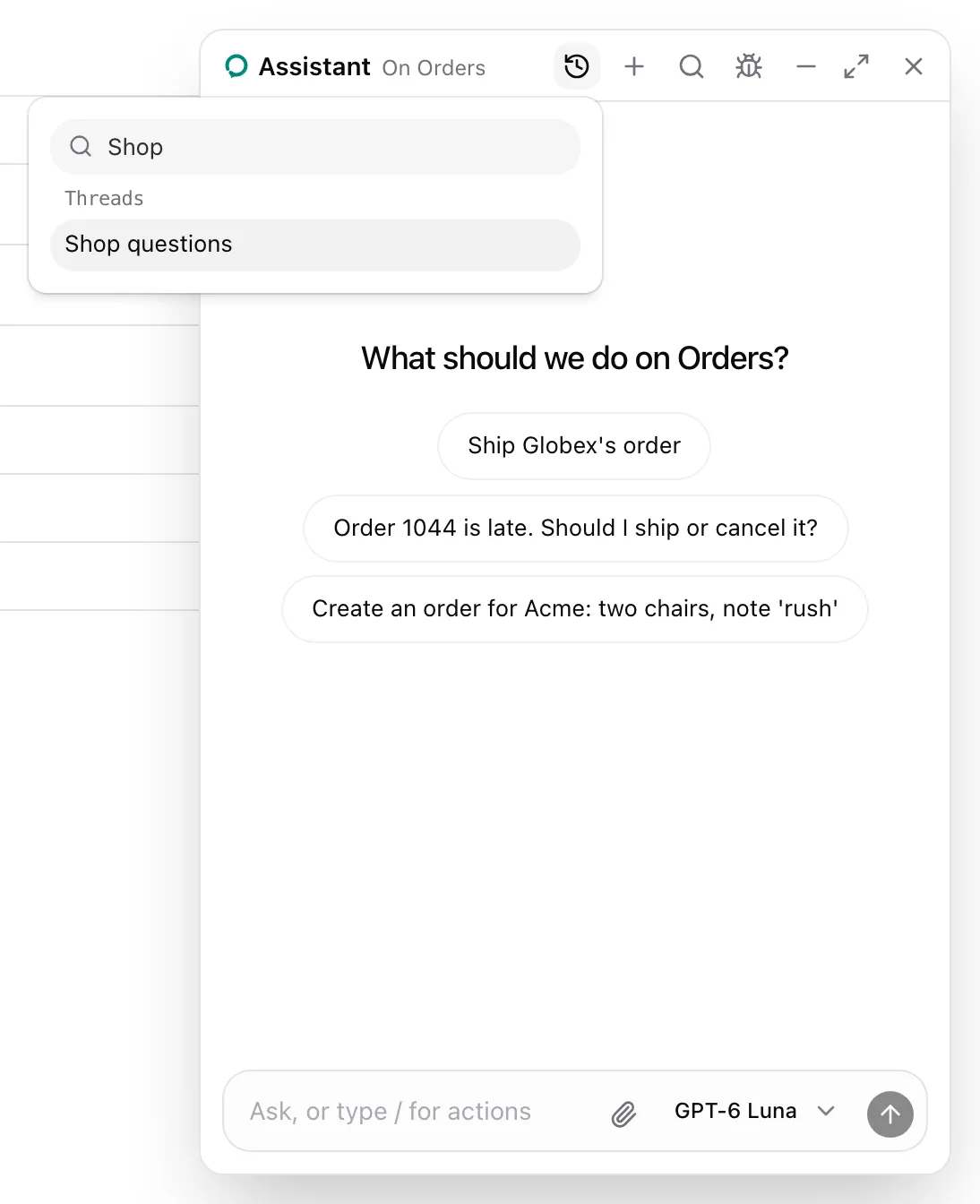
| `AssistedPanel.ThreadMenu` | Leaf | A History button that opens a popover with a search over the threads and their previews. |
| `AssistedPanel.ThreadSelect` | Row | A row with a native select over the threads, `NewThread` and `DeleteThread`. |
| `AssistedPanel.ThreadDrawerToggle` | Leaf | Opens and closes the drawer. |
| `AssistedPanel.ThreadDrawer` | Row | The thread list in a 256 px column over the conversation. Picking a thread or the backdrop closes it. |
| `AssistedPanel.ThreadTitle` | Text | The open thread's title, or "New thread". |
| `AssistedPanel.NewThread` | Leaf | Starts a new thread. |
| `AssistedPanel.DeleteThread` | Leaf | Deletes the open thread after a dialog asks. Disabled for a thread the runtime has not listed yet. |
### Picker styles
| `threads` | The default composition places |
| ------------------ | ------------------------------------------------------------------------------------------------------- |
| `true` or `"menu"` | `ThreadMenu` and `NewThread` in the header. |
| `"select"` | `ThreadSelect` in a row under the header. |
| `"drawer"` | `ThreadDrawerToggle` and `ThreadTitle` in place of the icon and title, `NewThread`, and `ThreadDrawer`. |
| `"side"` | `Threads` before `Main`, and nothing in the header. |
The menu's search reads each thread's title, and its `custom.group` and `custom.preview` when the runtime gives them. Threads without a title read "New thread" in the menu and "Untitled" in the select.
## Props
| Part | Props |
| --------------------------------------------------------------- | ------------------------------ |
| `ThreadMenu`, `ThreadDrawerToggle`, `NewThread`, `DeleteThread` | A button's props and `asChild` |
| `Threads`, `ThreadSelect`, `ThreadDrawer`, `ThreadTitle` | `className` |
`ThreadList`, the list `Threads` and the drawer show, is exported on its own for a list in your layout.
## See also
- [Use the hosted runtime](https://superassist.app/how-to/use-the-hosted-runtime.md#name-the-signed-in-user), so a user's threads follow them across browsers.
- [Header](https://superassist.app/components/panel/header.md) for where the default places them.