# AssistedAction

> Lends an element of an assisted page as an action the assistant presses, rings or asks about. With useAssistedAction, ring and useRing.

`AssistedAction` lends one element of an assisted page as an action: the assistant presses it, or, when it is consequential, rings it for the user or asks in the panel first. `useAssistedAction` is the hook behind it, and `ring` and `useRing` point at any element.
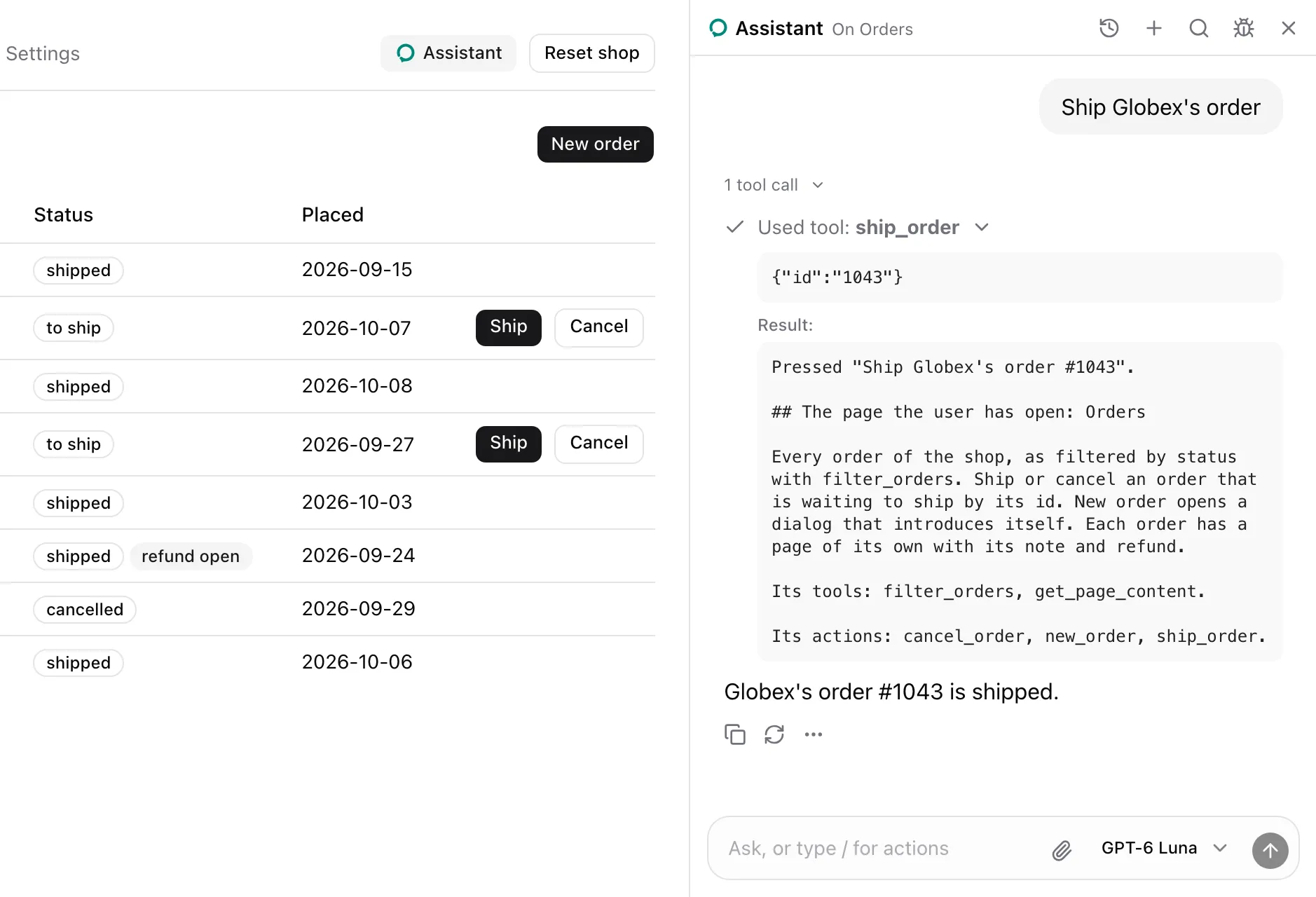
![Orders beside the sheet panel. The user asked to ship Globex's order; the expanded ship_order call answers Pressed Ship Globex's order #1043 with the Orders note, and the third row now reads shipped.](https://superassist.app/_astro/action-light.CSV_i4_y.webp)

## Usage

Give each row the same `name` and its own `id`. From `examples/app/app/orders/page.tsx`:

```tsx
<AssistedAction
  name="ship_order"
  id={order.id}
  label={`Ship ${order.customer}'s order #${order.id}`}
>
  <Button size="sm" onClick={() => shop.call("shipOrder", [order.id])}>
    Ship
  </Button>
</AssistedAction>
```

## What the model sees

Same-name actions on a page are one tool that picks a row by `id`. With the shop's seed data, `ship_order` is described as:

```txt wrap
Press one of these by its id. 1042: Ship Acme's order #1042; 1043: Ship Globex's order #1043; 1044: Ship Umbrella's order #1044
```

It takes `{ id }`, an enum of `1042`, `1043` and `1044`, and the Orders note lists it under `Its actions:`. A consequential action carries a marker. `cancel_order`, with `consequential="confirm"`:

```txt wrap
Press one of these by its id. 1042: Cancel Acme's order #1042 (asks first); 1043: Cancel Globex's order #1043 (asks first); 1044: Cancel Umbrella's order #1044 (asks first)
```

`refund_order` on an order's page, with `consequential`:

```txt wrap
Refund this order (consequential)
```

The press in the screenshot answered with its label and the page as the press left it:

```md wrap
Pressed "Ship Globex's order #1043".

## The page the user has open: Orders
```

The Orders note follows in full. Every answer is listed in [Model context](https://superassist.app/reference/model-context.md#action-answers).

## States

### Rung
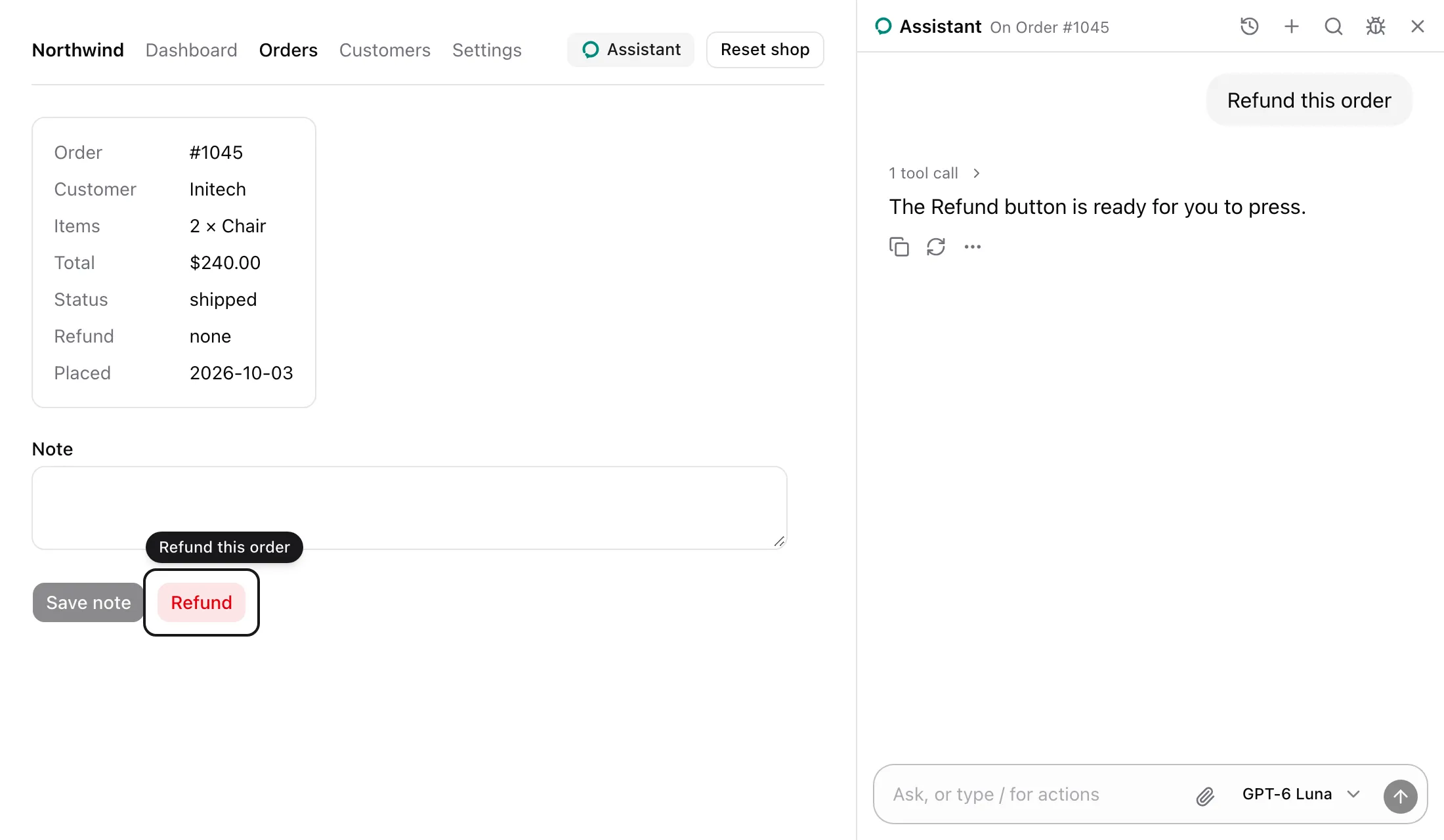
![Order #1045 with a ring around the Refund button and the label Refund this order above it. The panel says the Refund button is ready for the user.](https://superassist.app/_astro/action-rung-light.DZgB06tU.webp)

With `consequential`, a call rings the element and presses nothing. It answers `Rang "Refund this order" for the user; pressing it is theirs.`

### Asking
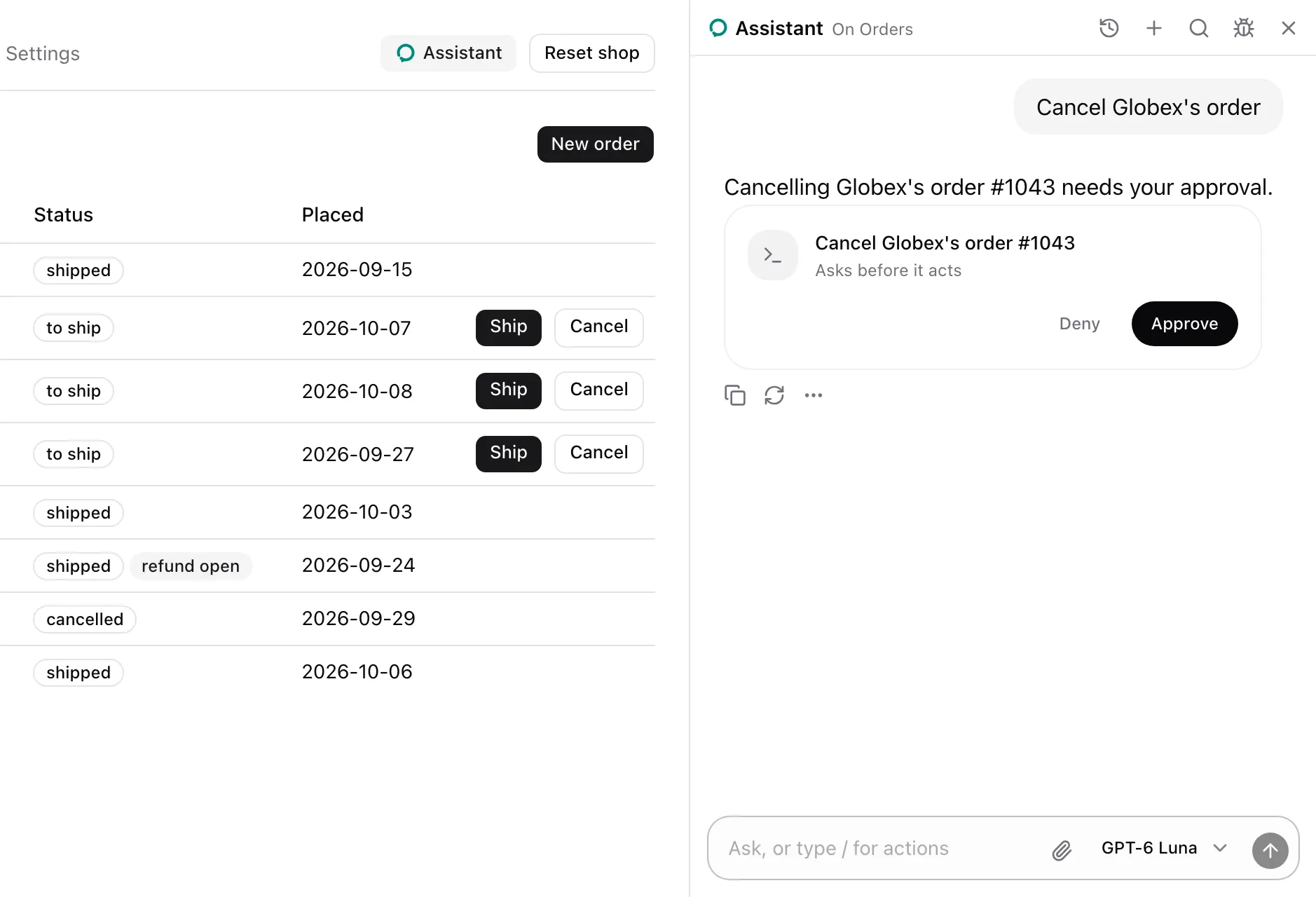
![Orders beside the sheet panel. Under the assistant's sentence, a card reads Cancel Globex's order #1043 with Approve and Deny.](https://superassist.app/_astro/action-confirm-light.BLflgrFi.webp)

With `consequential="confirm"`, a call asks in the panel with the picked row's label. The [Confirm card](https://superassist.app/components/cards/confirm-card.md) shows the question, and nothing is pressed while it waits.

### Declined
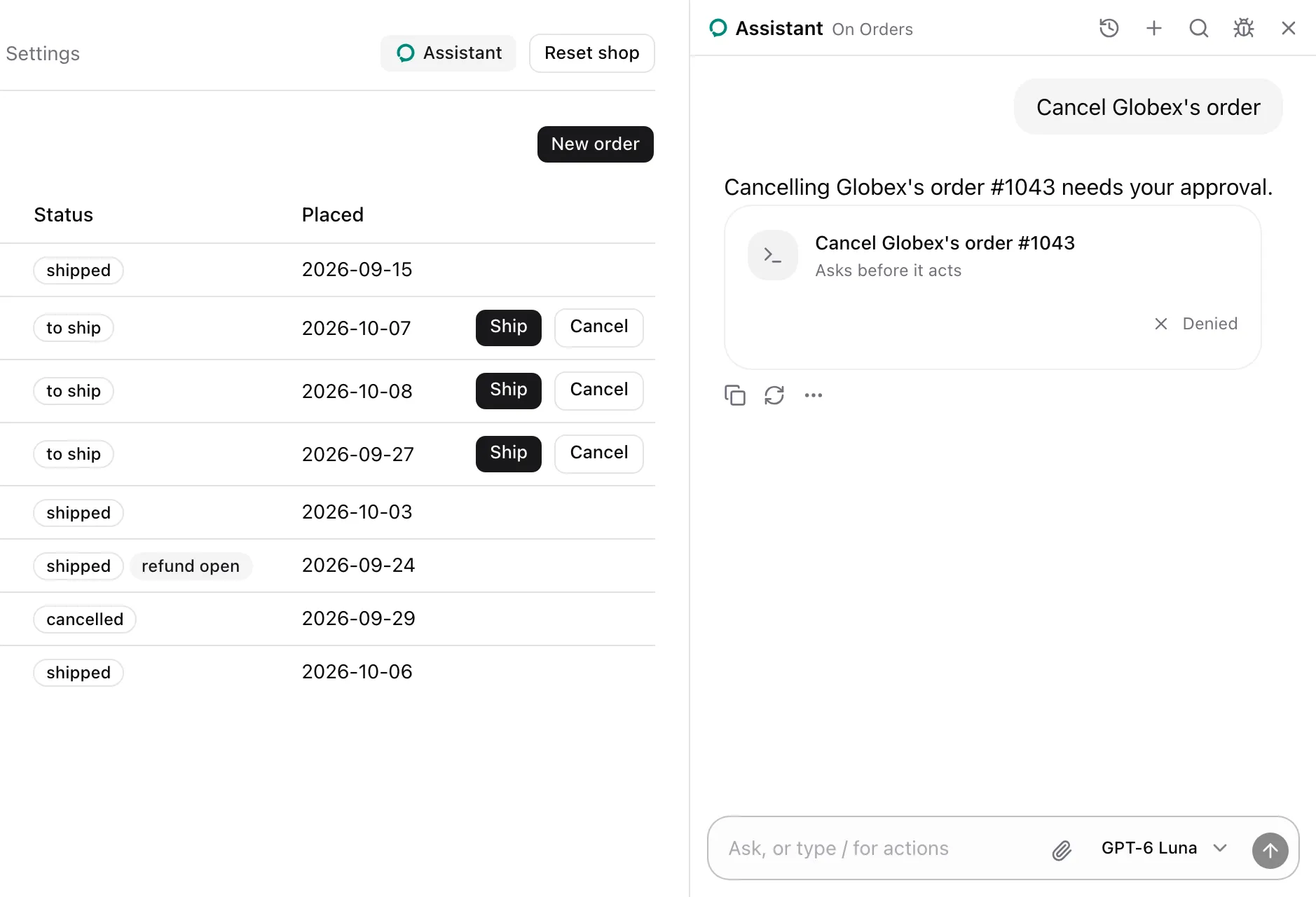
![The same view after Deny: the card reads Denied and order 1043 still waits to ship with its Ship and Cancel buttons.](https://superassist.app/_astro/action-declined-light.BgwLPTqK.webp)

Deny presses nothing, and the card stays as a receipt that reads Denied. The call answers `The user declined "Cancel Globex's order #1043". That is final: leave it unless they ask for it again.`

### Disabled
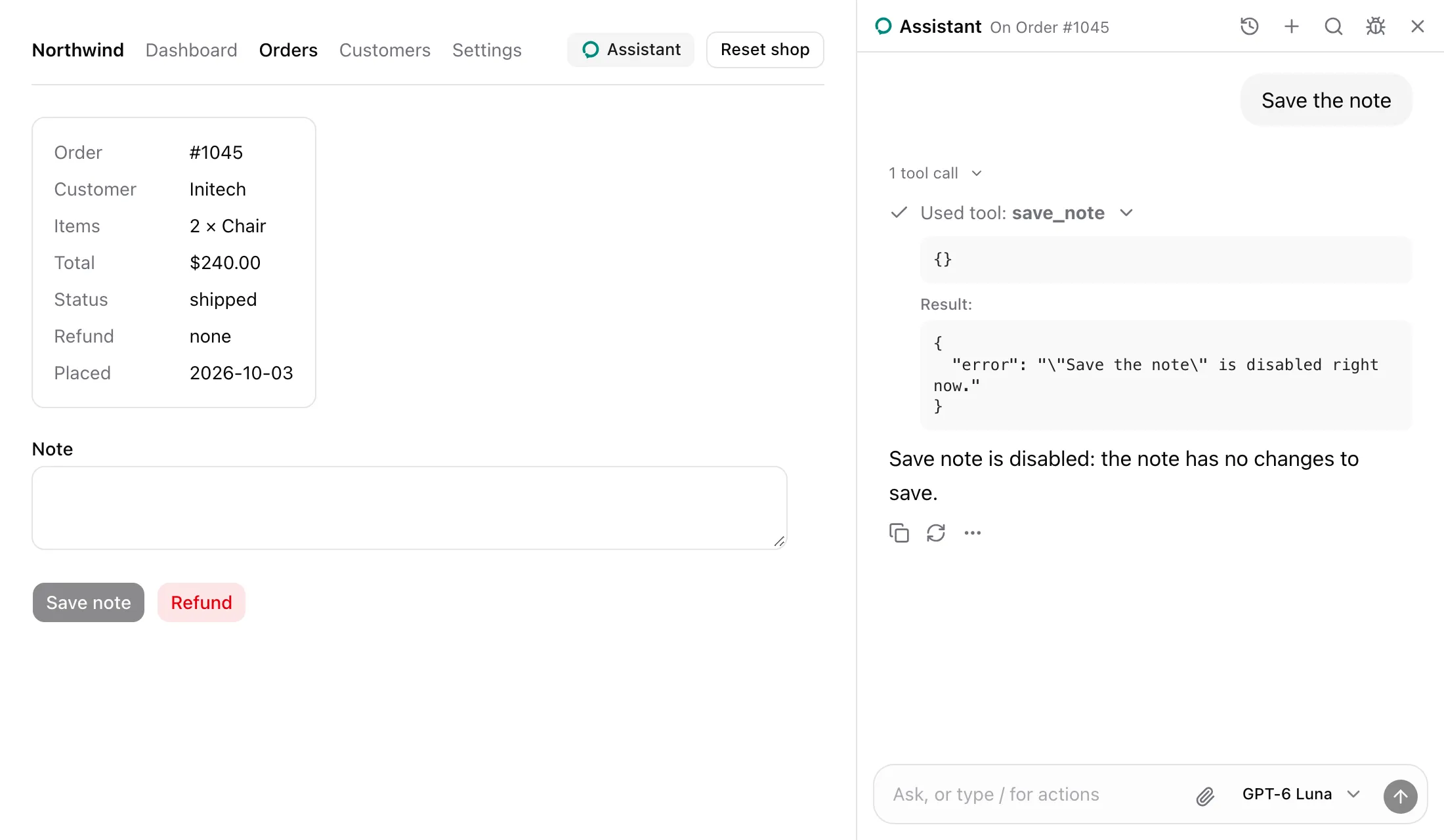
![Order #1045 with Save note disabled. The expanded save_note call answers with an error saying Save the note is disabled right now.](https://superassist.app/_astro/action-disabled-light.BgHMGFS0.webp)

A disabled element is not clicked. The call answers `{ error: '"Save the note" is disabled right now.' }`.

## Props

| Prop            | Type                   | Required | Description                                                                         |
| --------------- | ---------------------- | -------- | ----------------------------------------------------------------------------------- |
| `name`          | `string`               | Yes      | The action's name. Same-name actions on one page are one tool.                      |
| `label`         | `string`               | Yes      | What pressing does. Becomes the tool's description, or one entry of it.             |
| `id`            | `string`               | No       | The row's id within a same-name group.                                              |
| `consequential` | `boolean \| "confirm"` | No       | `true` rings the element for the user. `"confirm"` asks in the panel, then presses. |
| `trace`         | `boolean`              | No       | Shows the press on the page with a ring. Defaults to the provider's `trace`.        |
| `children`      | `ReactElement`         | Yes      | One element whose `ref` reaches a DOM element. Its own `ref` is kept.               |

- Throws `Render an assisted action inside an AssistedPage` outside a page.
- Without ids, the tool's description is the label with its marker, and it takes no parameters.
- With ids, the tool takes `{ id }` with an enum of the mounted rows' ids. Its description reads `Press one of these by its id.` followed by `<id>: <label>` pairs.
- A press waits for pending React updates to commit, then checks the element. Missing or disabled, it answers with an error and clicks nothing.
- `consequential` rings the element and answers that pressing is the user's.
- `consequential="confirm"` asks in the panel, checks the element again on approval, then clicks and answers `Approved by the user and pressed "<label>".` with the page's note. A denial answers with the decline text.
- A click answers `Pressed "<label>".` with the note of the page as the press left it, after the page changes or 300 ms.
- With `trace`, a click flashes a ring on the element, gone after a second or with the element. `"confirm"` rings the element while the panel asks, and the ring leaves with the answer.

## useAssistedAction

```ts
useAssistedAction<T extends HTMLElement = HTMLElement>(options: AssistedActionOptions): RefObject<T | null>
```

The hook behind `AssistedAction`. `AssistedActionOptions` is `{ name, label, id?, consequential?, trace? }`, as in the table above. Attach the returned ref to the element to press. Throws outside an `AssistedPage`.

## ring

```ts
ring(target: HTMLElement, options?: RingOptions): () => void
```

Points at one element, as in the Rung state. Returns a function that dismisses the ring.

| `RingOptions` field | Type      | Default                       | Description                                     |
| ------------------- | --------- | ----------------------------- | ----------------------------------------------- |
| `message`           | `string`  | `"The assistant points here"` | The word from the assistant beside the ring.    |
| `flash`             | `boolean` | `false`                       | Leaves on its own after a second, pulsing once. |

- One ring at a time. A new ring dismisses the open one.
- Scrolls the target to the center of the view, smoothly unless the user prefers reduced motion.
- Draws an outline 8 px outside the target that follows it as it moves, and pulses twice. Under reduced motion it fades once.
- Shows the message above the target, or below when there is no room. The message has `role="status"`.
- Dismissed by Escape, by any pointer down, by the target leaving the document, or by the returned function.
- A `flash` is also dismissed a second after it opens. `trace` on the provider flashes presses and fills this way.
- Sits at z-index 40. Colors come from `--primary` and `--primary-foreground`, with `#2563eb` and `#fff` as fallbacks.

## useRing

```ts
useRing(): (target: HTMLElement, options?: RingOptions) => () => void
```

`ring` for a component. Dismisses the ring it opened when the component unmounts.

## See also

- [Add actions and group row actions](https://superassist.app/how-to/add-actions.md).
- [Make an action consequential](https://superassist.app/how-to/make-an-action-consequential.md).
- [Why consequential actions ring](https://superassist.app/explanation/consequential-actions.md).
